
Home / Help & fixes / Apple Pencil won't connect to iPhone Duo
Help & fixes
Apple Pencil won't connect to iPhone Duo
Apple Pencil support arrived on iPhone Duo with iOS 27.2 on Oct 26, but only for Apple Pencil (USB-C). Here's how to fix a Pencil that won't pair, based on Apple's troubleshooting document and its iPhone User Guide.
As an Amazon Associate, iPhone Duo Guide earns from qualifying purchases. This doesn't affect what we recommend.
Key facts
Only Apple Pencil (USB-C) works with iPhone Duo, and it needs iOS 27.2 or later. If it won't connect, check Bluetooth, charge the Pencil, reconnect it with the USB-C cable and tap Tap to Connect, or unpair it in Settings > Bluetooth and pair again; if no Bluetooth accessory connects, Apple says to contact Apple Support.
Apple Pencil support officially arrived on iPhone Duo with iOS 27.2 on Oct 26, according to 9to5Mac's iOS 27.2 coverage. Common causes of connection problems include the wrong Pencil model, the wrong iOS version, or a pairing that needs to be redone.
Apple's Apple Pencil troubleshooting document for iPhone Duo and its iPhone User Guide page, Use Apple Pencil (USB-C) with iPhone Duo, cover the basics, and the steps in this guide follow them. This page explains what each step does, which parts are general Bluetooth advice, and when it's time to contact Apple. For setup and everyday use, see the guide to using Apple Pencil on iPhone Duo.
Which Apple Pencil works with iPhone Duo?
Just one. Apple's troubleshooting document says "Only Apple Pencil (USB-C) is compatible with iPhone Duo," and it requires iOS 27.2 or later. Apple's Apple Pencil page lists iPhone Duo among the devices compatible with Apple Pencil (USB-C).
That rules out the Apple Pencil Pro and other models: Apple's iPhone User Guide says "Other Apple Pencil models aren't compatible with iPhone Duo." If an Apple Pencil Pro won't pair, nothing is broken: iPhone Duo doesn't support it.
One more expectation to set. Apple's iPhone Duo spec page says hover isn't supported with Apple Pencil (USB-C) on iPhone Duo, so a tip that does nothing until it touches the glass is normal.
Apple Pencil (USB-C)
How Apple Pencil (USB-C) pairs with iPhone Duo
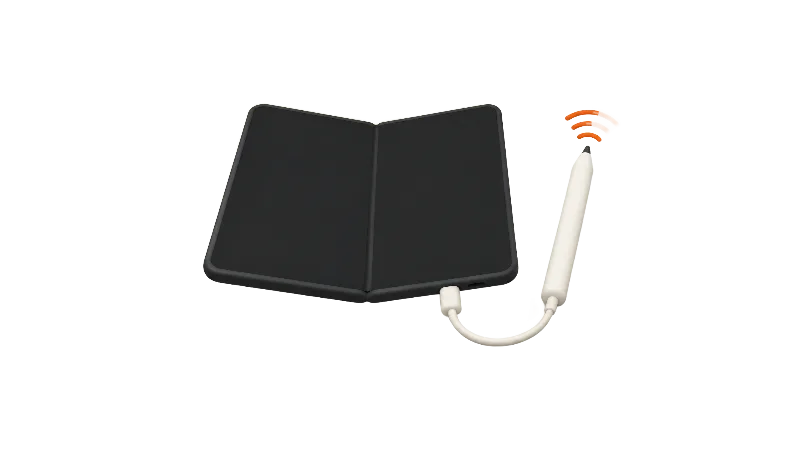
Apple says Apple Pencil (USB-C) pairs and charges via USB-C, on its Apple Pencil page. The iPhone Duo spec page lists a 1 m USB-C Charge Cable in the box, so the cable you need ships with the phone. More on that in what's in the box.
Apple's iPhone User Guide gives the steps: slide open the end of Apple Pencil, connect it to the USB-C charge cable that came with your iPhone Duo, plug the other end into iPhone Duo, then tap Tap to Connect. You can disconnect the cable once it's paired. The Pencil charges while it's plugged into iPhone Duo, and it can also charge from the cable and a USB-C power adapter.
The pairing can drop on its own. Apple says the Pencil stays paired until you restart iPhone Duo, turn off Bluetooth, or pair the Pencil with another device. If yours stopped working after a restart, that's the likely reason; to use it again, repeat the cable pairing steps.
What Apple's troubleshooting document says
Apple's iPhone Duo document starts with the checks anyone can do: confirm the Pencil model and iOS version, try a Pencil that's known to work, remove any third-party case, cover or screen protector, and check the Pencil's battery and charge it for a few minutes if it's low. Apple's iPhone User Guide says you can see the Pencil's battery level in the Batteries widget or in Settings > Apple Pencil.
It then suggests turning Airplane Mode on for 15 seconds and off again to reset wireless connections, and unpairing the Pencil and pairing it again. Parts of the same document are written for repair technicians, including diagnostic suites and part replacement. Those are not home fixes, so skip them and leave them to Apple.
Apple's separate iPad pairing troubleshooting page adds restarting with the Pencil connected, checking Bluetooth, forgetting the Pencil and letting it charge for about a minute. That page is written for iPad and doesn't mention iPhone Duo, so the steps in this guide use only the parts that match Apple's general iPhone Bluetooth guidance.
Unpairing: what Apple documents for iPhone
Apple's iPhone User Guide explains when the Pencil unpairs on its own: a restart, Bluetooth turned off, or pairing with another device. To remove it yourself, unpair it in Settings > Bluetooth, then pair it again with the cable. That matches Apple's general Bluetooth troubleshooting article, which says to unpair a previously connected accessory, put it back in discovery mode and pair it again.
Is it the Pencil or the screen?
Apple's document asks you to check whether the problem also happens with your finger. If finger touch misbehaves too, the issue is touch or the display, not the Pencil, and Apple's document treats that as a separate problem. The guides to lines, flicker and dead pixels and a soft spot along the fold cover display symptoms.
When to contact Apple
Apple's document suggests pairing a known-good Apple Bluetooth accessory, such as a Magic Keyboard. If that fails too, Apple says the phone may need service.
Apple's general Bluetooth troubleshooting article says to contact Apple Support if you can't turn on Bluetooth, the setting is grayed out, or you can't connect any Bluetooth accessory. You can start a request from Apple's repair page. Before you go, read how to prepare for a Genius Bar visit.
Bottom line
Updating to iOS 27.2 or later, charging the Pencil and reconnecting it with the cable addresses the most common causes. Apple's iPhone User Guide covers pairing, charging and battery level for iPhone Duo, and its troubleshooting document covers the rest. Beyond Apple's iPhone Duo pages, anything else here is general Bluetooth advice.
Once it's working, try handwritten notes or the best drawing and Pencil apps. More on the update in the iOS 27.2 guide for iPhone Duo. Did a fix not listed here work for you?
Steps
Check that you have Apple Pencil (USB-C)
Apple says only Apple Pencil (USB-C) is compatible with iPhone Duo. Apple Pencil Pro and other models won't pair.
Update to iOS 27.2 or later
Go to Settings > General > Software Update. Apple says Apple Pencil on iPhone Duo needs iOS 27.2 or later, on both the inner and outer displays.
Make sure Bluetooth is on
Open Settings > Bluetooth and check that Bluetooth is turned on; Apple says turning it off unpairs the Pencil. Apple's troubleshooting document also suggests turning Airplane Mode on for 15 seconds, then off, to reset wireless connections.
Charge and reconnect with the cable
Slide open the end of the Pencil and connect it to iPhone Duo with the USB-C charge cable that came in the box. It charges while plugged in, so let it charge for a few minutes if the battery is low, then tap Tap to Connect. You can check the battery in the Batteries widget or Settings > Apple Pencil.
Unpair the Pencil and pair again
Apple's troubleshooting document says to unpair Apple Pencil and pair it again. Unpair it in Settings > Bluetooth, then reconnect it with the USB-C cable and tap Tap to Connect.
Remove the case and try another accessory
Take off any third-party case, cover or screen protector and try again. If you can, test a Pencil you know works, or pair another Apple Bluetooth accessory such as a Magic Keyboard.
Contact Apple if nothing connects
If no Bluetooth accessory will connect, or Bluetooth won't turn on, Apple says to contact Apple Support. Start a request from Apple's repair page at support.apple.com/repair.
Frequently asked questions
Why won't my Apple Pencil Pro connect to iPhone Duo?
Does Apple Pencil (USB-C) pair over Bluetooth or with a cable?
Why does my Apple Pencil stop working after I restart iPhone Duo?
Why doesn't hover work with Apple Pencil on iPhone Duo?
Found this useful? Share it.
As an Amazon Associate, iPhone Duo Guide earns from qualifying purchases. This doesn't affect what we recommend.
Sources (9)
From Apple
Coverage
Last verified
