
Home / How-to & tips / iPhone Duo half-open modes: tent, laptop and book poses
How-to & tips
iPhone Duo half-open modes: tent, laptop and book poses
iPhone Duo can stand on its own when folded partway, and Apple's user guide names three half-open poses: like a book, like a tent, and seated. Here's what each pose does, which apps respond, and where the limits are.
Key facts
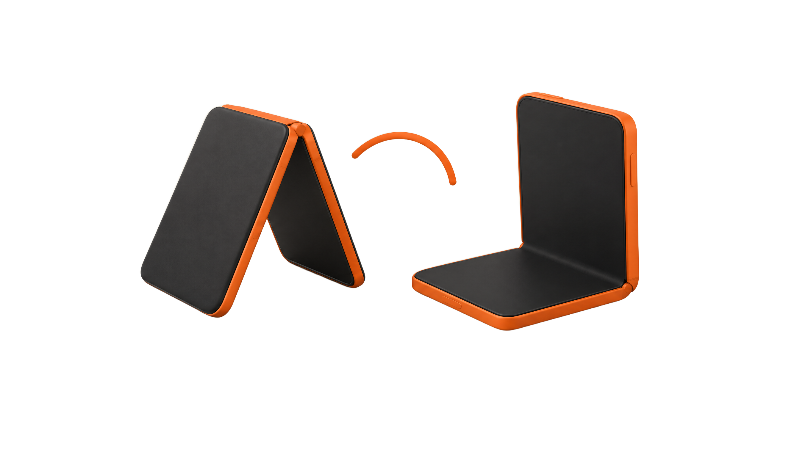
Apple names three half-open poses for iPhone Duo: like a book, like a tent, and seated, the pose that looks like a small laptop. Seated suits video and hands-free FaceTime, tent puts the outer display toward you for glanceable info or toward someone you're photographing, and book suits StandBy and Smart Take. Apple hasn't published hinge angles, but reviewers found the hinge holds a range of positions.
iPhone Duo can stand up on its own when you fold it partway, and Apple's Pose iPhone Duo guide names three half-open poses: like a book, like a tent, and seated. "Laptop" isn't one of Apple's pose names, but Apple's developer documentation for iPhone Duo pictures the phone folded like a tent and folded like a laptop.
What Apple calls the half-open poses
Each of Apple's poses is tied to a display and an orientation.
- Like a book: the inner display faces you in landscape, and Apple suggests holding it or setting it down for StandBy or Smart Take photos.
- Like a tent: the outer display faces you in landscape, for glancing at information from a distance or showing the screen to someone you're photographing.
- Seated: the inner display faces you in portrait, for watching video from a distance with playback controls at the bottom or taking a FaceTime call without holding the phone.
The seated pose is the one that looks like a small laptop. Replying to a developer's question on Apple's developer forums, an Apple Media Engineer called the partially open pose "mini laptop" mode. That's a forum reply, not Apple documentation.
How far does the hinge open, and does it hold?
Apple hasn't published hinge angles or fixed stop positions. Its iPhone Duo product page says only that the hinge opens and closes with "smooth, balanced resistance," and the launch announcement says the hinge uses more than 100 components to control opening and closing.
Reviewers found that it stays put. 9to5Mac's Chance Miller wrote in his iPhone Duo review that the hinge holds the phone steady at various angles for seated and tent setups. Macworld's Britta O'Boyle reported the hinge is stiff enough to leave partly open at nearly any angle, including a tented position and roughly 90 degrees.
One of the manual checks in Apple's hinge troubleshooting document is whether the hinge holds in all positions, and Apple says there are no diagnostics or software remedies for hinge issues. If your Duo won't hold an angle, that's a service question, not a setting. More on hinge care and how reviewers rated the hinge.
What changes on screen when you fold partway
Apple's developer documentation says content moves between displays as iPhone Duo is opened, closed, partially folded and rotated, and that views adapt to the folding region when the phone is partially folded. In its adaptive layouts tech talk, Apple says the fold region is only active when the phone is folded; when flat, it's inactive and has a width of zero.
The same talk explains that when the phone is propped up on a table, the top half suits content viewed from a distance and the bottom half suits interactive controls. In another demo, Apple shows Podcasts keeping Now Playing in the left region defined by the fold.
Video follows the same split: in the seated pose, Apple's Pose guide says video plays with playback controls at the bottom. Apple's product page also says you can pin a video to the top of the inner display while using another app. Macworld also reports that the keyboard reshapes itself for each posture; more on the inner-screen keyboard.
Which apps use tent and laptop modes
Apple says its own apps are optimized for iPhone Duo, and its features cover the obvious cases. Camera's Smart Take works when you set the phone on a table or flat surface, and Apple's What's new with iPhone Duo guide says it detects when you're posing and takes photos automatically. The launch announcement says FaceTime works whether the phone is held open or propped on a surface for hands-free calls, and that StandBy runs on either the outer or inner display. More on StandBy on iPhone Duo.
The laptop pose has a camera wrinkle. In the same reply on Apple's developer forums, the Apple Media Engineer said only the inner screen lights up in laptop mode, with the outer display facing down on the desk, and that apps can still use the rear camera.
Third-party support depends on each developer. Apple's multiple displays tech talk says apps can read the hinge status (closed, partially open or fully open) and follow the hinge angle continuously. TechCrunch's Sarah Perez highlighted Wakeout, which has a different interface for each position, Flighty's En Route Mode for a tent-shaped Duo on a tray table, and Tiny Computers, which is built around laptop mode. Apple tells developers that system-provided views and containers adjust around the fold automatically, but custom views have to be updated to handle it, so how well an app adapts varies. Our running list is in the best apps for iPhone Duo.
Limits worth knowing
MagSafe stands are the main catch. MacRumors, citing a demonstration by YouTuber Mrwhosetheboss (Arun Maini), reports that an unfolded Duo can tilt on upright MagSafe stands because the MagSafe ring sits on only one half of the back, and suggests charging closed or on a flat charger. MacRumors didn't cover half-folded charging, and Apple hasn't said anything about it. See MagSafe charger picks.
Sound is the other trade-off. 9to5Mac says Apple tuned the speakers for seated and tent use, but Miller found them thinner and quieter than the iPhone 18 Pro's speakers.
If you want an angle the hinge pose doesn't give you, Apple says the iPhone Duo Folio's built-in kickstand supports a wide range of angles. More on the iPhone Duo Folio with Kickstand, or pair a half-open pose with Split View.
Bottom line
Tent and laptop modes are poses, not modes you switch on, though you can choose which positions turn on StandBy. Apple's apps already respond to them, with third-party apps catching up one update at a time. The seated pose is the most useful for video and FaceTime, and the tent pose earns its place for photos and StandBy. Which pose do you use most?
Steps
Pick the pose for the task
Apple's Pose iPhone Duo guide lists three half-open poses: like a book (inner display, landscape), like a tent (outer display, landscape) and seated (inner display, portrait). Use seated for video and hands-free FaceTime, tent for showing the outer screen to someone you're photographing, and book for StandBy or Smart Take.
Fold it partway with two hands
Open iPhone Duo and fold it back to the angle you want. Apple hasn't published hinge angles, but reviewers at 9to5Mac and Macworld found the hinge holds the phone steady at a range of angles. 9to5Mac describes opening the Duo as a two-handed job.
Set it on a flat, stable surface
Place the phone on a table or other flat surface. Apple's What's new with iPhone Duo guide says Smart Take starts when you set the phone on a table or flat surface and begin a session in Camera.
Use seated for video and FaceTime
In the seated pose, Apple says video plays with playback controls at the bottom, and you can take a FaceTime call without holding the phone.
Use tent for photos and glanceable info
In the tent pose the outer display faces you or your subject. Apple says this pose is for glancing at information from a distance or showing the display to someone you're photographing. See our StandBy guide for which poses start StandBy.
Check the hinge holds
If the Duo won't stay at an angle, Apple's hinge troubleshooting document lists checking that the hinge holds in all positions and says there are no software fixes for hinge issues. Remove third-party cases first, then contact Apple for service.
Frequently asked questions
Does iPhone Duo have a tent mode?
What is laptop mode on iPhone Duo?
Can I lock the hinge at a specific angle?
Do all apps work in tent and laptop modes?
Can I charge iPhone Duo half-open on a MagSafe stand?
Found this useful? Share it.
Sources (13)
From Apple
- ApplePose iPhone Duo - iPhone User Guide
- AppleWhat's new with iPhone Duo - iPhone User Guide
- AppleiPhone Duo
- Apple NewsroomApple unveils iPhone Duo
- Apple SupportiPhone Duo Troubleshooting Hinge Issues
- Apple DeveloperPreparing your app for iPhone Duo
- Apple DeveloperStrike a pose with adaptive layouts on iPhone Duo
- Apple DeveloperLeverage multiple displays and scenes on iPhone Duo
- Apple Developer ForumsCamera direction and rotation in the half-folded pose on iPhone Duo
Coverage
Last verified
