
Home / How-to & tips / App continuity between iPhone Duo's two screens
How-to & tips
App continuity between iPhone Duo's two screens
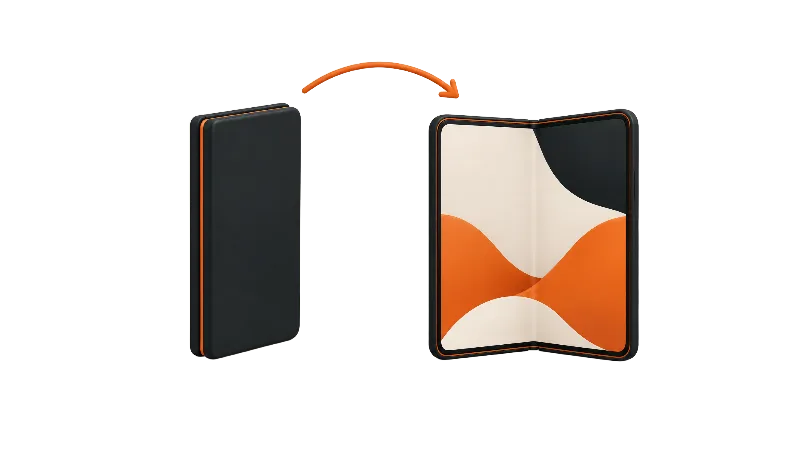
Apps on iPhone Duo move between the outer and inner displays as you fold and unfold, and Apple says you can keep going where you left off. How the app looks after the switch depends on the SDK its developer used, and Apple's guides don't document a setting for this.
Key facts
Apple says apps built with the iOS 27 SDK or later resize as you open and close iPhone Duo, so you can pick up where you left off on either display. Apple documents no setting for this; apps built with the iOS 26 SDK or earlier still run, but in a smaller window on the inner display; an iOS 27 SDK build fills most of the inner display, and an iOS 27.1 SDK build uses all of it.
Apple says apps on iPhone Duo move smoothly between the 5.4-inch outer display and the 7.6-inch inner display as you open and close the phone, so you can carry on where you left off. How cleanly that happens depends on the app, and specifically on which version of Apple's software kit its developer built it with.
Here's what Apple documents, what reviewers found, and what to do when an app doesn't cooperate.
What happens when you unfold or fold
In its October 22 developer roundup, Apple says apps move smoothly from the outer display to the inner display because the two screens share an aspect ratio, letting people "pick up right where they left off." Apple's example is Netflix, where you can browse Clips on the outer display and keep watching on the inner display.
Apple's developer page for iPhone Duo spells out the mechanics: apps built with the iOS 27 SDK and later resize dynamically, expanding to fill the inner display when you unfold and returning to the outer display when you fold. Apple also tells developers that a fold can resize an app in the middle of a session.
The app isn't restarted in the process. In a summary of its iPhone Duo group lab on the Apple Developer Forums, Apple says a display change is a size change, not app termination, and that "your process stays alive." The same summary says the system generally keeps scroll position, text you're typing, and video playback position on its own.
Picture in Picture follows its own rule. Apple's group-lab summary says a PiP window moves to the outer display only when the phone is closed, with the system handling the move.
Which apps continue cleanly
Apple's developer page describes three tiers, and they explain most of what you'll see on screen.
Apps built with the iOS 26 SDK or earlier still run, but they don't adapt to every layout. Open, the app sits in the center of the inner display with empty space around it; closed, its content sits to the left of the status bar and camera. Apps built with the iOS 27 SDK fill most of the inner display but still avoid the status bar on the right edge. Apps built with the iOS 27.1 SDK or later use the full display, with toolbars and tab bars running vertically below the status bar.
That last tier is what earns the "Made for iPhone Duo" label in the App Store. MacRumors reports that developers must build with the iOS 27.1 SDK or later to qualify. Apple told 9to5Mac on Nov 6 that well over 100,000 apps built for iPhone Duo are already on the App Store.
Reviewers mostly credited the switching itself. In Macworld's review roundup, PCMag found the move from the front screen to the inner screen smooth and Tom's Guide praised the switching between displays. Tom's Guide also found large black bars on both sides of non-optimized apps such as Disney Plus and The Weather Channel, which matters because those bars eat into the inner display you paid for.
Is there a setting for this?
Not one Apple documents. Apple's Pose iPhone Duo and What's new with iPhone Duo pages in the iPhone User Guide cover the poses, StandBy, Smart Take and Split View, but neither describes a switch for which apps continue across displays. iClarified's list of seven iPhone Duo settings doesn't include one either.
So the fix for a letterboxed app isn't a toggle. It's an update from the developer.
What about Split View?
Apple's Split View page describes Split View for when iPhone Duo is open in landscape. Apple hasn't said which of two side-by-side apps continues when you close the phone.
Apfelpatient reports that the app on the right is the one that stays: it fills the screen if you rotate to portrait and appears on the outer display if you fold. The same report says that opening one app of a saved pair also launches the other, as long as iPhone Duo is open and held in landscape. Apple's Tech Talk on displays and scenes adds that new windows can't be created on the outer display, only on the inner one.
More on that: using Split View on iPhone Duo and dragging content between apps.
For developers
Apple's Human Interface Guidelines ask developers to keep functionality and the state of elements the same between displays. The scene, trait and layout details live in our guide to adapting an app for iPhone Duo.
Bottom line
On paper, continuity on iPhone Duo is automatic for apps built with current tools, and early partners such as Netflix, Zoom and Slack are already using the folding design, per Apple. Apps built with the iOS 26 SDK or earlier still run, but in a smaller window on the inner display; an iOS 27 SDK build fills most of the screen, and an iOS 27.1 SDK build uses all of it. For a list of apps already updated, see the best apps for iPhone Duo.
Which apps still letterbox on your Duo?
Steps
Check the App Store label
Open the app's App Store page and look for the Made for iPhone Duo label. MacRumors reports that the label requires an iOS 27.1 SDK build, which per Apple's developer page uses the full display.
Update the app
Open the App Store, tap your profile picture, tap App Updates, then tap Update or Update All. To keep apps current automatically, go to Settings > Apps > App Store and turn on App Updates, per Apple's support document.
Place the app you want to keep on the right
Before folding from Split View, put the app you want to keep using on the right. Apfelpatient reports that the right-hand app is the one shown on the outer display after you fold; Apple hasn't documented this itself.
Quit and reopen an app that stops responding
If an app stops responding after you open or close iPhone Duo, open the App Switcher, swipe up on the app to quit it, then reopen it from the Home Screen. Apple says to restart iPhone if the app still doesn't respond.
Frequently asked questions
Does an app restart when I unfold iPhone Duo?
Is there a setting to make apps continue on the outer display?
Why does an app have black bars on the inner display?
Which app stays when I close the phone from Split View?
Found this useful? Share it.
Sources (17)
From Apple
- Apple NewsroomDevelopers bring incredible new app experiences to iPhone Duo
- Apple NewsroomApple unveils iPhone Duo
- AppleiPhone Duo Technical Specifications
- Apple DeveloperThree steps to make your app shine on iPhone Duo
- Apple Developer ForumsA Summary of the iPhone Duo Group Lab
- Apple DeveloperDesigning for iPhone Duo (Human Interface Guidelines)
- Apple DeveloperLeverage multiple displays and scenes on iPhone Duo (Tech Talk 111464)
- Apple SupportPose iPhone Duo
- Apple SupportWhat's new with iPhone Duo
- Apple SupportOpen two apps in Split View on iPhone Duo
- Apple SupportQuit and reopen an app on iPhone
- Apple SupportHow to manually update apps from the App Store
Coverage
Makers and developers
- ApfelpatientiPhone Duo Split View
Last verified
