
Home / Help & fixes / iPhone Duo's nano-texture layer, explained
Help & fixes
iPhone Duo's nano-texture layer, explained
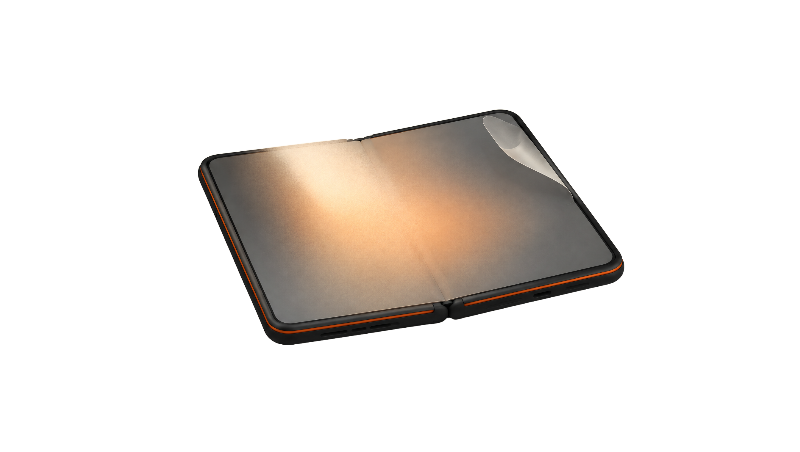
iPhone Duo's 7.6-inch inner display has a matte nano-texture cover layer that Apple says reduces glare and reflections and makes the crease harder to see. Here's what it is, where else Apple uses nano-texture, how Apple says to clean it, and what a replacement costs.
Key facts
The nano-texture layer is a replaceable polymer cover on iPhone Duo's inner display that Apple says cuts glare and reflections and minimizes crease visibility. Apple says to clean it with a polishing or display microfiber cloth, and replacing the layer costs $49, or $19 with AppleCare+ (Apple pricing as of Nov 3, 2026).
The iPhone Duo nano-texture finish is the matte surface on the 7.6-inch inner display, and Apple says it exists to cut glare and reflections. According to the iPhone Duo page, the inner screen is a Super Retina XDR folding display built from more than 10 ultrathin layers with a custom nano-texture finish. This guide covers what the layer is, how to look after it, what reviewers made of it, and what it costs to replace. It's a reference explainer built from Apple's pages and published reviews, not a hands-on test.
What Apple says the nano-texture layer is
In its iPhone Duo announcement, Apple says the nano-texture finish reduces glare and reflections and creates a matte surface that "minimizes crease visibility and feels great to touch." Apple describes the top of the inner display as a scratch-resistant coating plus a nano-textured cover layer made from a custom polymer, which it says has up to 40 percent higher stiffness than other materials used in the industry. Below that, Apple says high-strength glass sits above and below the folding panel, with adhesives that let the layers slide past each other as the phone folds.
That polymer detail matters. On Apple's Macs and iPads, nano-texture is glass that MacRumors described as etched at the nanometer level, while the Duo's matte surface is a separate cover layer that can be removed and replaced.
Where else Apple uses nano-texture
Nano-texture started on the Pro Display XDR, and MacRumors reported in 2019 that Apple etched the glass to reduce reflectivity and glare for a matte look. Apple's nano-texture cleaning guide now lists it as an option on the Apple Studio Display, Pro Display XDR, iMac, MacBook Pro and iPad Pro (M4), and says iPhone Duo comes with a nano-texture cover layer on the inner display. When it reached the iPad Pro in 2024, MacRumors noted it was a $100 option limited to the 1TB and 2TB models, and the first time Apple had put nano-texture on a touchscreen device.
So the Duo appears to be the first Apple product where nano-texture comes standard rather than as an extra-cost option.
How Apple says to clean it
Apple's support document says to use a clean Apple Polishing Cloth, another microfiber cloth made for electronic displays, or a fabric made from a cotton and elastane or spandex blend. For stubborn smudges, Apple allows a cloth moistened with 70 percent isopropyl alcohol, used infrequently. That's looser than Apple's original 2019 Pro Display XDR guidance, which MacRumors reported allowed only the dry Apple cloth and no liquids.
The full routine, including how to wash the cloth, lives in our guide to cleaning the inner screen.
What reviewers said about the look and the crease
Reviewers mostly liked it. In Macworld’s review roundup, The Verge calls the matte inner display "a big step up from foldables with glossy, seemingly soft screens," and Wired credits Apple's layered display for making the fold hard to spot. PCMag was more measured, saying the crease is still visible with the display off and can be felt with a finger.
Joanna Stern compared the matte screen with the Galaxy Z Fold 8 in bright sunlight on the Hudson River, and also found fingerprints hard to clean off and the crease still visible (our summary of her review).
Not invisible, then. Just harder to see.
Durability is the trade-off. MacRumors reports JerryRigEverything's scratch test marked the inner screen at Mohs level 2, though he credited the matte coating with hiding those marks while the screen is on, iPhone in Canada reports. His video ends with a sponsor segment for dbrand, his channel sponsor (our summary of his durability test).
iFixit's teardown explains why the layer matters, as iClarified reports: microscopic bumps on the removable cover scatter reflections and disguise the dip at the fold, and removing the cover makes the crease more apparent and leaves a surface that scratches more easily.
Apple warns against removing the layer yourself because the display beneath can be damaged, 9to5Mac reports.
More on the fold itself in our crease explainer.
The cover layer is replaceable, and here's the fee
According to MacRumors, the nano-texture cover layer above the inner display can be removed and replaced by Apple. Apple's iPhone repair page lists cover-layer service at $49 without AppleCare+ and $19 with it, as of Nov 3, 2026. iClarified, citing iFixit, says Apple's replacement procedure needs specialized fixtures and precise alignment, so this is a service job rather than a peel-and-stick fix.
That price is the most reassuring number on the Duo's repair list, especially next to the $999 out-of-warranty inner display fee. The full table is on our Apple repair costs page.
Should you put a screen protector on it?
It's a real trade-off on a matte surface. Apple's cleaning guide doesn't mention screen protectors for the inner display. Since iFixit's findings tie the Duo's low glare and hidden crease to the textured cover itself, a film laid on top is likely to change both, with a glossy film bringing back the reflections that 9to5Mac says appear once the layer is gone.
Given a $19 or $49 replacement, the layer is arguably the protector already. We weigh both sides in whether to use an inner screen protector.
What about the inner-display issue?
Separately from wear on the cover layer, Apple acknowledged an inner-display issue on Oct 26 and said affected owners should contact AppleCare for a replacement, per iClarified. Owners have described bright lines, cracks, or a crunching sound when opening the phone, near the fold. Apple hasn't published a failure rate. Our teardown roundup covers what's known.
Bottom line
The nano-texture layer is the reason the Duo's big screen handles glare and hides its crease better than glossy foldables, according to reviewers, but it's soft, it holds fingerprints, and it's not meant to come off at home. The good news is that Apple prices its replacement at $19 with AppleCare+ and $49 without, as of Nov 3, 2026.
Frequently asked questions
Is the iPhone Duo nano-texture layer a screen protector?
How much does it cost to replace the nano-texture cover layer?
Can I peel off the nano-texture layer myself?
What should I clean the inner screen with?
Found this useful? Share it.
Sources (17)
From Apple
- Apple SupportHow to clean your iPhone
- Apple NewsroomApple unveils iPhone Duo
- AppleiPhone Duo
- Apple SupportHow to clean your nano-texture Apple display
- Apple SupportiPhone Repair & Service
Coverage
- MacRumorsiPhone Duo cover layer and battery fees
- MacRumorsApple's Pro Display XDR With Nano-Texture Can Only Be Cleaned With Special Apple-Provided Cloth
- MacRumorsiPad Pro's $100 Nano-Texture Glass Option Only Available With 1TB and 2TB Models
- MacRumorsiPhone Duo fails JerryRigEverything durability test
- 9to5MaciPhone Duo tested to destruction, including removing nanotexture layer
- MacworldiPhone Duo review roundup: a little weird, a lot of fun and a breath of fresh air
- iClarifiediFixit investigates iPhone Duo screen failures, points to possible hinge issue
- iClarifiedApple acknowledges iPhone Duo inner display issue, offers replacements
- iPhone in CanadaiPhone Duo JerryRigEverything durability test
- MacStoriesiPhone Duo review roundup: great hinge, messy apps and everybody misses Face ID
Makers and developers
- YouTube (Joanna Stern)We Put Apple's iPhone Duo Through HELL. Here's What Happened.
- YouTube (JerryRigEverything)iPhone Duo Durability: Destroyed
Last verified
